Corporate just updated the liability language in the standard waiver. The email went out to all 12 franchise owners three weeks ago. Location 3 updated theirs the same day. Location 7 still has not. Location 11 updated it, but changed a few clauses while they were in there.
Nobody noticed until a claim came in.
This is the multi-location waiver problem, and it is more common than most franchise operators want to admit. When each location manages its own documents, the result is a patchwork of outdated templates, inconsistent language, and compliance gaps that corporate has no visibility into until something goes wrong.
The solution is not more emails to franchise owners. It is a centralized waiver platform that gives corporate control over every document across every location, without taking away the operational flexibility that individual owners need to run their business day to day.
Why Multi-Location Waiver Management Breaks Down
The problem starts with good intentions. A franchise launches, corporate sends over a waiver template, and each location sets it up however they can. Some use paper. Some digitize it with a basic tool. A few just copy the template into a Google Form and call it done.
Over time, locations customize their documents. Language drifts. Updates do not get applied consistently. Staff turn over, and nobody at the new location knows which version of the waiver is the right one. Corporate has no central view of what any location is actually using, how many waivers are being collected, or whether the documents being signed would hold up in court.
The liability exposure here is not theoretical. A waiver that lacks current legal language, was never updated after a facility change, or was modified by a location manager without legal review is a waiver that may not protect you when you need it most.
The operational costs are just as real. Every time corporate needs to update a document, someone has to contact each location individually, confirm the update was made, and follow up with the ones that did not respond. For a franchise with 20 locations, that is a part-time job.
One Dashboard for Every Location
The foundation of OtterSign Enterprise is a unified executive dashboard that gives corporate visibility into every location from a single login.
From one screen, you can see usage metrics, waiver volume, check-ins, and performance data across your entire network. If one location is signing 400 waivers a week and another is signing 40, that gap is visible immediately. If a location stops collecting waivers entirely, you know before a problem develops.
Location switching is built into the dashboard. Jump into any individual location’s account with one click, with no extra login credentials, no password sharing, and no data bleed between accounts. Corporate sees everything. Location managers see only their own data. The access structure matches the organizational structure.
Corporate Document Control: Update Once, Deploy Everywhere
The most operationally valuable feature in OtterSign Enterprise is the Smart Document Builder for franchises. Corporate creates master documents once and deploys them across all locations with a single click.
When the legal team updates liability language, corporate makes the change in the master document and pushes it network-wide. Every location is on the current version immediately. There is no email chain. There is no following up with the three locations that did not respond. The update happens once and it is done.
Corporate branding controls mean that every location’s documents carry the same logo, colors, and visual identity. A customer signing a waiver at a franchise location in Denver sees the same branded experience as one signing at a location in Atlanta.
Enterprise template controls let corporate lock the sections that matter most, such as liability language, arbitration clauses, and activity-specific risk disclosures, while leaving room for local customization where flexibility is appropriate. Franchise owners get the autonomy they need without the ability to inadvertently compromise the documents that protect the brand.
Onboarding New Locations in Minutes, Not Weeks
Every franchise network eventually adds locations. The traditional onboarding process means sending over document templates, waiting for them to be set up, reviewing what the location built, and correcting the inevitable inconsistencies.
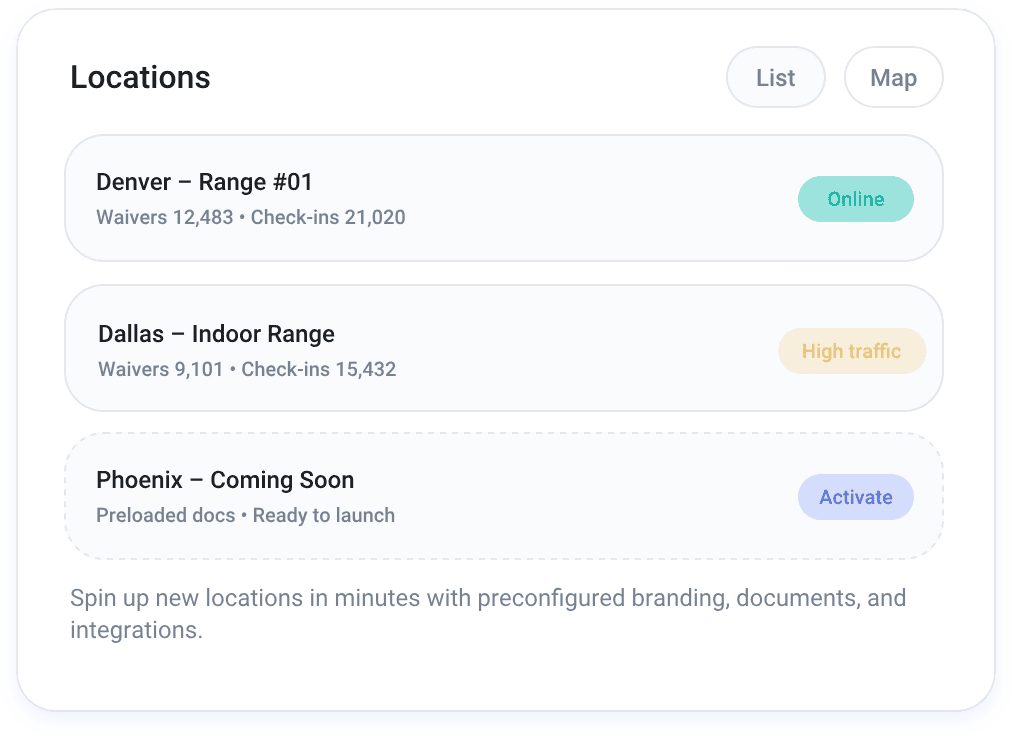
With OtterSign Enterprise, a new franchise location launches with preloaded documents, settings, branding, and integrations already in place. Corporate configures the standard setup once. Every new location that spins up inherits it automatically.
From the new location’s perspective, they open OtterSign and their documents are ready to go. From corporate’s perspective, they know with certainty that the new location is starting from the same compliant, brand-approved baseline as every other location in the network.
Security and Access Controls at Scale
A franchise network is not a single team. It is corporate staff, regional managers, individual franchise owners, location managers, front desk staff, and potentially contractors or seasonal employees, all of whom need different levels of access to the same platform.
OtterSign Enterprise handles this with role-based permissions that let you assign precise access levels for every role in the organization. Corporate administrators can see and edit everything. Location managers can access their own location’s data and documents. Front desk staff can collect signatures and view check-in records. Nobody sees more than they need to.
For larger organizations with existing identity infrastructure, optional Single Sign-On lets employees authenticate using their existing corporate credentials. Two-factor authentication adds a second layer of protection on critical admin access across all locations.
Every signed agreement includes a structured document ID and a detailed activity log, so there is a clear, auditable record of what was signed, when, and by whom.
Integrations Built for Franchise Operations
Most franchise networks already run software for scheduling, point of sale, CRM, or access control. OtterSign Enterprise connects to those systems rather than replacing them.
The enterprise team handles custom integration setup for your specific platform stack, whether that means connecting to a franchise management system, syncing with a CRM, or integrating with facility access control so a signed waiver automatically unlocks a door or activates a wristband.
For organizations that need to build custom workflows beyond the standard integration library, Enterprise plans include API access with developer guidance. The full API documentation is available at api.otterwaiver.com for technical teams evaluating integration options.
Full Network Visibility With the Custom Enterprise Dashboard
For franchise operators who want a single view of the entire business, not just waiver data, OtterSign offers an optional custom enterprise dashboard that unifies data from OtterSign, OtterText, and OtterOrder.
From one executive hub, you can track revenue, marketing performance, customer activity, review volume, and operational metrics across every location. Instead of pulling reports from three different tools and trying to reconcile them in a spreadsheet, everything is in one place.
Migrating an Existing Franchise Network
If your franchise network already has waivers in place, whether on paper, in another digital tool, or in a mix of both, OtterSign’s document migration services handle the transition.
The enterprise team converts your existing waivers, agreements, and templates into OtterSign’s Smart Document Builder format, with consistent formatting across every location. You do not have to rebuild documents from scratch or train franchise owners to recreate something they already have.
A dedicated Enterprise Success Manager guides the rollout and ensures the network goes live without disruption to day-to-day operations. For organizations with strict uptime and performance requirements, an optional SLA is available.
Getting Started With OtterSign Enterprise
If your franchise network is still managing waivers location by location, the gap between what you have and what is possible is significant. Centralized document control, one-click global updates, role-based access, and full network visibility are available in OtterSign today.
See everything OtterSign Enterprise includes at ottersign.com/enterprise.
Ready to talk through your franchise network specifically? Contact the enterprise sales team or book a 15-minute demo to see the platform in action.