It is 11 o’clock on a Saturday morning. Court 2 is booked for a birthday party that arrives in 20 minutes. A school group just walked in for Court 4. And there is already a line of walk-in families at the front desk, each one waiting for a clipboard.
This is the trampoline park check-in experience on any given weekend. High volume, mostly kids, a mix of pre-booked groups and spontaneous walk-ins, and a front desk that becomes a bottleneck the moment two groups arrive at the same time.
Paper waivers make this problem worse. Every family that fills out a form at the desk adds time to the line behind them. Every waiver that gets handed to a staff member is one more document to file, search through later, and hope was filled out completely.
Digital waivers do not just move the paper to a screen. They move the entire signing process off the desk and out of the check-in line entirely. Here is how trampoline parks are using OtterSign to handle high-volume Saturdays without the chaos.
Why Trampoline Parks Have More Waiver Complexity Than Most Businesses
Most businesses that collect waivers deal with adults signing for themselves. Trampoline parks deal with something considerably more complicated: hundreds of minors, signed in by dozens of different parents, across multiple booking types, all arriving around the same time.
A typical Saturday might include walk-in families with two or three kids each, a birthday party booking with 15 to 20 guests, a school or scout group with a chaperone situation that needs to be documented, and members who visit weekly and do not want to re-sign every time.
Each of these scenarios has different signing requirements. Walk-ins need a fast self-serve option. Party hosts need a way to collect signatures from all their guests before the day. Groups need a manifest-style view so you know who is covered. Members need a validity window that does not expire after every visit.
Paper handles none of these well. A single digital waiver system handles all of them.
Minor Consent at Scale
The foundation of any trampoline park waiver system is minor consent, and OtterSign’s minor consent flow is built specifically for businesses where most participants are kids.
When a parent receives a waiver link, they can sign on behalf of up to 10 children in a single session. They enter their own information once as the guardian, then add each child by name and date of birth. Each child receives their own individual waiver record, with the parent’s signature, the signing timestamp, and the full audit trail attached.
Age-conditional logic means the waiver can automatically surface relevant fields based on a child’s age. Medical information, emergency contacts, and activity-specific disclosures are all captured in the same signing session. The parent does not fill out five separate forms for five kids. They complete one session and every child is covered.
Every completed waiver generates a 30-point audit trail and a Certificate of Authenticity. If a liability question ever comes up, your documentation is complete, retrievable, and legally defensible.
Pre-Arrival Signing for Party and Group Bookings
Birthday parties are one of the highest-revenue booking types a trampoline park can have, and they are also the most logistically complicated from a waiver standpoint. A party of 18 kids means 18 individual waiver records, signed by parents who may not all be present at the same time.
The solution is to move signing to before the booking day entirely.
When a party is booked through OtterSign, the host receives a waiver link immediately as part of the confirmation. They can share that link with every invited family in their own group chat, email, or text. Each parent signs for their own children from home, on their own schedule, in the days before the party.
By the time the party arrives at the door, every signed waiver is already in your dashboard. Check-in becomes a confirmation rather than a collection process. The host is not scrambling to collect signatures at the desk. Your staff is not managing a stack of paper while also wristbanding 18 excited kids.
The same approach works for school groups, scout troops, and any other organized booking. Send the link to the group coordinator. They distribute it to parents. You see real-time signing status as waivers come in, and you can send a targeted reminder to anyone who has not signed before the visit date.
Walk-In Families and the QR Code Solution
Not every family books in advance. Walk-ins are a core part of the trampoline park business model, and they need a check-in experience that is just as fast as pre-booked guests.
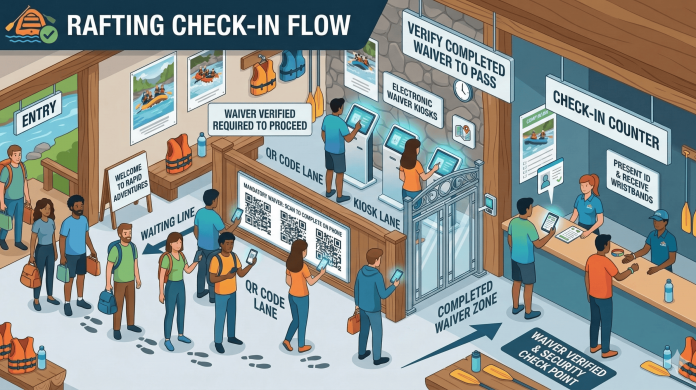
OtterSign generates a QR code for every document you create. Post it at the entrance, on a tabletop sign at the desk, and on a display near the grip sock station. Families scan the code on their phones, complete the waiver, and the signed record appears in your dashboard instantly.
For most families, this happens while the kids are getting their socks on. By the time they reach the desk, the waiver is already done. Staff confirm the signing, issue wristbands, and move to the next family without ever touching a clipboard.
For businesses managing multiple documents or planning to update their waiver content over time, OtterSign’s One-Link feature gives you a single permanent QR code that always points to your currently active documents. Print it once, put it everywhere, and it never needs to be reprinted because something changed.
When Someone Shows Up Without a Signed Waiver
Even with QR codes at the entrance and pre-arrival links sent to every booking, some families will arrive without a signed waiver. A parent forgot. The link did not get forwarded. A guest was added to the party at the last minute.
With paper, turning that family away or holding up the line while they fill out a form are the only real options.
With OtterSign, a staff member can send a waiver link to the parent’s phone in seconds. The parent receives an SMS with a direct signing link, completes the waiver on their phone, and the record appears in the dashboard before the family has finished checking in. No printer. No backup clipboard. No delay for the people behind them in line.
Waiver Expiration and Frequent Visitors
Members and frequent jumpers present a different challenge. Asking a family that visits every Saturday to sign a new waiver every single time creates friction and slows down the regulars who should have the fastest check-in experience of anyone.
OtterSign’s waiver expiration settings let you define exactly how long a signed waiver remains valid. Set it to 30 days, 90 days, one year, or whatever matches your policy. When a waiver is approaching expiration, OtterSign automatically sends the guardian a notification with a link to re-sign. They handle it from their phone before their next visit. Your staff never has to track it.
For annual pass holders and members, this means one signing event per year rather than one per visit. The check-in experience for regulars becomes a scan and go, and your records stay current without any manual follow-up.
What to Include in a Trampoline Park Waiver
A legally sound trampoline park waiver needs to address the specific risks of the activity and the fact that most participants are minors. At minimum, your waiver should cover the following.
Assumption of risk specific to trampoline activity, including jumping, flipping, contact with other jumpers, foam pits, and any specialty courts or equipment in your facility. Specificity matters here. A generic activity waiver is weaker than one that names the exact activities and risks involved.
Minor consent and guardian acknowledgment, confirming that the signing adult is the parent or legal guardian and has the authority to sign on the child’s behalf.
Medical information, including known conditions, allergies, and any physical limitations that staff should be aware of. Include authorization for emergency medical treatment if a parent cannot be reached.
Park rules acknowledgment, confirming that the participant has read and agrees to follow the posted rules of the facility. This is particularly important for incidents that result from rule violations.
Photo and media release, if your park photographs or films participants for social media or marketing use.
OtterSign’s pre-built trampoline park waiver template includes all of these fields, ready to customize with your park’s name, branding, specific attractions, and any state-specific language your legal counsel recommends.
Getting Set Up Before Your Next Busy Weekend
OtterSign takes about 30 minutes to configure for a trampoline park. Start with the pre-built trampoline park template, customize it for your facility, and decide how you want to deploy it. Most parks run all three channels: a QR code posted throughout the lobby for walk-ins, a waiver link embedded in every booking confirmation for pre-arrival signing, and a kiosk at the desk for anyone who needs a guided experience.
From there, the system runs itself. Waivers come in, records are stored, and your staff spends check-in time on hospitality rather than paperwork.
Start your free trial with 100 credits included.
Want to see the minor consent flow and party booking setup in action before you commit? Book a 15-minute demo and we will walk through it for your specific park.